Published in Tech Community
First Claude Code KL Community Meetup in Malaysia

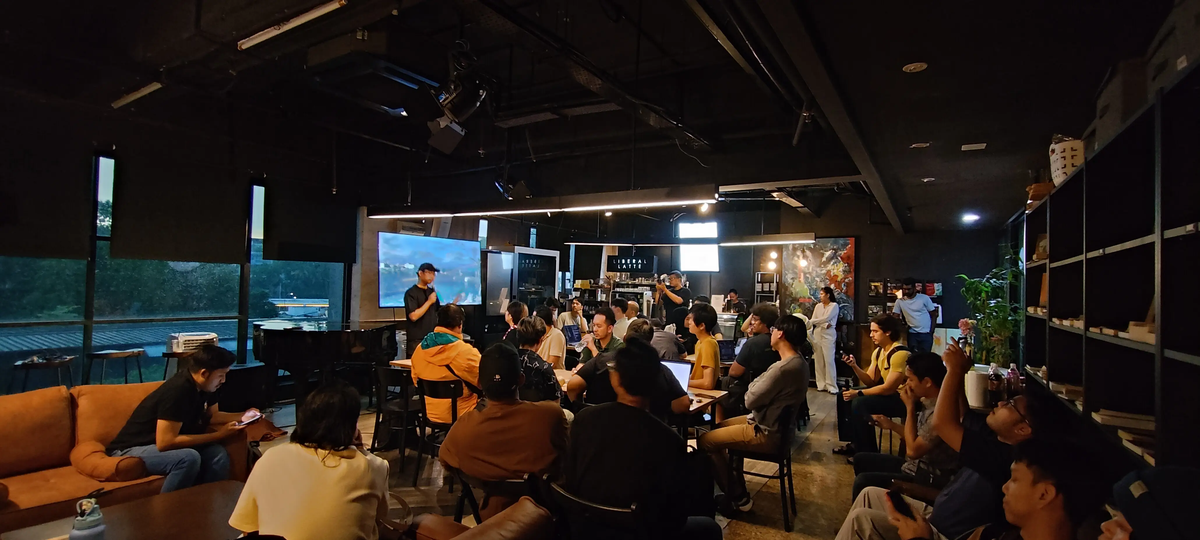
Event Overview
On December 12, 2025, Malaysia's tech community witnessed a milestone: the first ever Claude Code community meetup, organized by Hazli Johar at Liberal Latte in Kuala Lumpur. The intimate gathering brought together developers, founders, and tech enthusiasts to explore Claude Code's capabilities and share real-world implementation experiences.
Key Highlights:
- Venue: Liberal Latte in Wisma E&C (sponsored by Anthropic)
- Format: Interactive demos, hands-on presentations, and community knowledge sharing
- Attendance: Mix of paying Claude Code subscribers and curious developers
- Focus: Practical applications, workflow optimization, and advanced features
It was raining that evening, but there were covered walkways from the MRT Semantan station up to around 100 meters from the venue. Hazli also provided pictured directions so I didn't get lost.
Key Presentations & Demonstrations
Hazli Johar - Organizer & Community Vision
Hazli opened the evening by sharing his journey from complete non-technical founder to shipping production code. About nine years ago, he ran a company which he eventually sold to an international firm. After that exit, he met his co-founder and decided to tackle something in the accounting space - not accounting software per se, but training models focused on document understanding and accounting domain integrations at scale.
The turning point came last year around November, when Claude Code emerged. As Hazli explained:
"I never wrote any single line of code, but after one year from then... I always try and then I always say I actually tell my CTO this is great and he said no that's rubbish because it doesn't really... you know... it's not like really engineering work then when this came I think it's outstanding and then Claude Code is even even better because it allows you to understand what the hell is happening in the code base."
Key Messages:
- Claude Code enables 3x-5x productivity gains even for non-engineers
- The tool works well for both technical and non-technical users
- Philosophy: "Every feature is a problem that you solve - that's how we think"
- It's not about "just getting AI to do it" - it's about understanding the problem first
Hazli now runs Cynco, a startup focused on fixing the gap that he sees in the accounting industry. His workflow demonstration showed the thought process of starting projects - from building beautiful websites to iterating on open source code bases from GitHub.
One memorable anecdote captured the power of the tool:
"I was like in the grab car and then open up my laptop just click get it done you know make no mistake so I mean that's how Claude Code right so it's so good."
Hazli's Vision for the Community:
"My objective is that everyone can access to this without paying any single sense that's my objective and they learn and they contribute so that's the whole idea of this community... but we have to support each other, get interactions, getting customer introductions, referrals. I think this is how it works in the community - if you help people to get a customer to get friends to get partnerships they'll remember, they'll come and tell you okay you helped me last time... that's what happened in Silicon Valley."
A representative from Anthropic was scheduled to join us remotely and perhaps have an announcement (free tokens maybe??) or share with us their roadmap but unfortunately that didn't happen.
Akil's Deep Dive - Agent Skills & Subagents
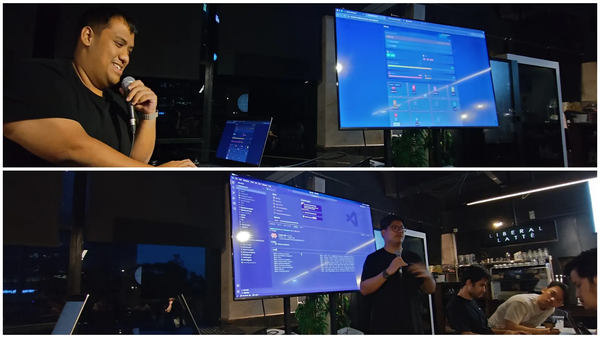
The next presenter was Akil. He delivered what I think was the presentation which I learned most about Claude Code - a technical walkthrough of agent skills and subagents. The presentation covered how these two advanced features enable sophisticated multi-agent workflows and knowledge management in Claude Code.
We can see Akil presenting with his VS Code editor displayed on the large screen, showing the directory structure with folders like .claude-plugin, agents, commands, and various markdown files - the building blocks of advanced Claude Code configurations.
What Made This Presentation Stand Out:
Akil didn't just explain concepts - he showed actual implementation. His screen displayed real configuration files, demonstrating how to:
- Structure skills and subagents within a project
- Organize these features for maintainability
- Integrate multiple agents working together
- Build production-ready multi-agent systems
Key Concepts Covered:
- How agent skills provide reusable, specialized knowledge to Claude
- The difference between skills (teaching expertise) and subagents (task delegation)
- Practical file organization in the
.claude/directory - Real-world use cases for multi-agent orchestration
- When to use which feature for different scenarios
The technical depth resonated particularly with experienced developers in the audience, showing how to move beyond basic Claude Code usage to building sophisticated, production-ready systems with these advanced features.
Several attendees mentioned this was their biggest learning from the meetup - understanding that Claude Code is not just a coding assistant, but a full framework for orchestrating AI agents.
Interactive Demo Session - MCP with Figma
One of the evening's major learnings for me came from demonstrations of using Model Context Protocol (MCP) to connect Claude Code with Figma.
What Was Demonstrated:
- Connecting Claude Code to Figma's design files in real-time
- Extracting design tokens, components, and layouts automatically
- Converting Figma frames directly into production-ready code
- Maintaining design system consistency through automated implementation
The demos showed real projects where developers could simply share a Figma link with Claude Code and have it generate pixel-perfect implementations - a workflow that previously took hours of manual translation now completed in minutes.
The Impact:
One participant described their experience: "What used to take me 3-4 hours now takes literally 10 minutes." The demonstrations weren't just proof-of-concepts - these were production workflows actively being used by agencies and development teams.
The MCP integration eliminates the traditional design-dev handoff friction. Designers work in Figma as usual, but now developers can directly access that design data programmatically, ensuring every pixel, color, and spacing value matches the original design with mathematical precision.
My Lightning Talk (LT)
In traditional PyCon fashion, I offered to show in 5-minutes (also known as an LT) what I was building with Claude, which was a simple mikuji app that makes calculation and gives you a traditional mikuji based on your own birth date data. Unfortunately the live demo didn't work, and I ended up telling the audience about Python ver. 1.5.2 and giving them hints to how much older I am to the rest of the room.
Rizwan's Dual Demo: B40 Life Simulator & Live Client Project
Rizwan, a software developer from Penang, delivered which I think was one of the most entertaining presentations of the evening. He gave the audience two demos:
- His B40 Life Simulator hackathon game
- Building a paid client project from scratch in 5 minutes
Live Client Project Demo:
Rizwan set up a realistic scenario: "So we came to this coffee shop. The coffee shop owner suddenly asked me, 'Can you make a website? I pay you 500 ringgit.'"
He then proceeded to:
- Open Claude Code and link it to a project folder
- Take a photo of the cafe's logo using his phone
- Give Claude a prompt: "Build a Y2K premium looking website"
- Specify the framework (Vite for simple JavaScript)
- Let Claude generate the website while he showcased his game
This demonstration perfectly captured the real-world freelancing workflow - taking on small paid projects and using Claude Code to deliver quickly.
The B40 Life Simulator Game:
While Claude was generating the website, Rizwan showed his more ambitious project: B40 Life Simulator - a survival game that simulates the financial struggles of Malaysia's B40 income group (bottom 40% income bracket).
The Game Concept:
Players take on the role of a fresh graduate trying to survive for four weeks in Kuala Lumpur. The game captures the harsh economic realities faced by many young Malaysians:
- Weekly Objectives: Go to work, buy groceries, fill petrol, pay debt
- Resource Management: 11 energy points per week, each action costs 1 energy
- Stress & Health Systems: Skip activities to save money but increase stress by 15%
- Game Over Conditions: Run out of energy, health drops to 0, or stress reaches 100
What Made It Special:
The game uses Claude to generate dynamic narratives for workplace scenarios. During the demo, Rizwan showed how every work session generates unique AI-powered conversations with NPCs. For example, in one scenario, the boss "Cik Ahmad" says:
"Hey, new staff. I see your university result. Not bad, but in this company, performance is everything. Your first project is coming up. Can you handle the pressure?"
Players then choose responses that affect their health, stress, and credit score - all generated contextually by Claude.
The Challenge:
Rizwan revealed the brutal reality of the game: "Until now, nobody win. You know why? Because you need to pay RM6,000 debt at the end of the month."
This accurately reflects the financial pressures many young Malaysians face - earning minimum wage while managing rent, transport, food, and debt.
Technical Implementation:
- Built using Cursor and Claude for the Cursor hackathon
- AI-generated dialogue and scenarios for endless replay value
- Leaderboard system tracking who survives longest with most cash
- Realistic Malaysian context (Petronas stations, KL locations, actual costs)
Community Response:
The game resonated with attendees as it tackled a real social issue through interactive media. Several participants had already tested it (as shown in the leaderboard), and suggestions emerged for expanding it - including adding a "negotiate with the bank" option for the debt.
Key Insight:
Hazli noted an important observation during Rizwan's demo: "One thing I noticed... you use Claude to do the UI, right? You see the UI is almost the same. So that's one of the things that we can improve."
This highlighted a common challenge - Claude Code tends to generate similar-looking UIs across different projects. The community discussed strategies to address this through better prompting and custom design systems.
Rizwan's dual demo showed Claude Code's versatility - from quick client work generating income, to ambitious personal projects that push creative boundaries.
Community Discussions & Learnings
Throughout the evening, several themes emerged from the discussions that went beyond the formal presentations:
Reverse Engineering & Learning:
One participant shared their learning approach: "I think Claude is very transparent... you all can explore a lot of things by reverse engineering, you know, something that probably makes you curious why is it like that - can we make something different? So I think that's the whole idea."
Excel & Claude Code for Business Automation:
An unexpected use case emerged around Excel automation. One attendee shared their experience: "That's my favorite because I'm confident so I always use that and then my client will say why did you sum it so fast - it was like three months so now it's like in a few weeks so it's crazy right."
This sparked a discussion about using Claude Code not just for traditional software development, but for automating business processes, data analysis, and report generation.
Plan Mode Best Practices:
Questions arose about effectively utilizing Claude Code's plan mode versus execute mode. Experienced users shared their strategies:
- Using plan mode for complex, multi-step tasks requiring research
- How to structure prompts to get better plans
- When to switch between plan and execute modes
- Combining plan mode with subagents for better results
Honest Feedback Culture:
Hazli emphasized the importance of honest feedback in the community: "We have to be honest when people ask for feedback... we just tell them what's good what's not good. Like someone was showing me 'oh I built a ledger' so I was like are you sure this is a ledger? I mean I just give honest opinion, otherwise you keep in your bubble like 'I think I do the right thing.' So that's help right?"
Personal Learnings
Two major things I learned from attending this meetup:
1. MCP with Figma for Design Implementation
Seeing live demonstrations of Claude Code connecting to Figma and converting designs to code in real-time was transformative. This isn't just a nice-to-have feature - it fundamentally changes the design-to-development workflow.
What This Means:
- Designers continue working in Figma without changing their process
- Developers get programmatic access to design specs, tokens, and components
- Pixel-perfect implementation becomes automated, not manual
- Design system consistency happens automatically
This integration addresses one of the biggest pain points in product development - the handoff between design and engineering.
2. Agent Skills and Subagents
Akil's presentation revealed the power of multi-agent workflows. The concept of creating specialized subagents with specific tool permissions, combined with reusable agent skills for domain knowledge, opens up sophisticated automation possibilities.
The Revelation:
Claude Code isn't just a coding assistant - it's a framework for orchestrating multiple specialized AI agents. You can build systems where:
- Different agents handle different aspects of a project
- Each agent has specific expertise and tools
- Agents can leverage shared knowledge (skills)
- Complex workflows happen through agent coordination
This changes the mental model from "AI helps me code" to "AI agents work as a coordinated team."
Understanding the Key Concepts
During the meetup, three advanced Claude Code features were highlighted. Here's a brief overview:
Model Context Protocol (MCP)
What is it?
MCP is an open standard that allows Claude Code to connect with external tools, databases, and services. Think of it as a universal adapter - like USB-C for AI applications.
How it works:
Instead of building custom integrations for every tool, MCP provides a standardized way for Claude Code to communicate with external systems. Connect to GitHub, Google Drive, Slack, Figma, databases, and hundreds of other services through MCP servers.
We've had what we developers call APIs up until now, but with MCP your AI can know how to use APIs without having you learn the documentation.
Why it matters:
- Access your company's data and tools directly from Claude Code
- Standardized connections mean less maintenance
- Community-built servers for popular services available
- Keep your data secure within your infrastructure
Example from the meetup:
The Figma MCP integration showed how designers' work flows directly into code generation, with Claude Code reading design specs, extracting tokens, and generating pixel-perfect implementations.
Learn more:
- Official MCP Documentation
- MCP Servers Repository for implementation examples
- Figma MCP Guide which also has an explanation of what MCP servers are
- MCP Tutorial with Examples
Agent Skills
What are they?
Agent Skills are reusable packages of specialized knowledge that teach Claude how to perform specific tasks. They're like training materials that make Claude better at particular domains.
How they work:
Skills are markdown files containing instructions, examples, and best practices. Claude automatically loads relevant skills based on what you're working on. For example, a "pandas-analysis" skill might teach Claude your team's data analysis conventions.
Why they matter:
- Portable expertise that works across all conversations
- Automatic activation based on context
- Shareable with team members for consistency
- Progressive loading (only loads what's needed)
Insight from Akil's presentation:
Skills enable consistency at scale - your entire team can have Claude follow the same coding standards, design patterns, and best practices automatically. As one presentation slide showed, skills can be organized by domain (coding standards, API patterns, security practices) and reused across projects.
Learn more:
- Skills Explained - Official Blog from Anthropic themselves
- Skills vs Commands vs Subagents - Practical Guide (I should have read this first)
- Skills Tutorial: Claude Code Skills vs Subagents - When to Use What?
Subagents
What are they?
Subagents are specialized AI assistants with their own context windows and specific tool permissions. They handle discrete tasks independently and return results to the main agent.
How they work:
You create subagents for specific roles (e.g., "code-reviewer", "database-architect", "frontend-developer"). When Claude encounters a matching task, it delegates to that specialized subagent. Each operates independently with controlled access to tools.
Why they matter:
- Parallel task execution for complex workflows
- Context isolation prevents confusion
- Granular control over what each agent can do
- Specialized expertise for different domains
Key demonstration from Akil:
Multi-agent workflows where different subagents handle different aspects of a project - one designs the backend, another builds the frontend, another reviews security, all coordinated by the main Claude instance. The .claude/agents/ folder structure shown in Akil's presentation demonstrated how these agents are organized and configured.
Learn more:
- Subagents Documentation
- Awesome Claude Code Subagents Collection
- Subagents in Practice
- Complete Claude Code Stack Guide
How They Work Together
The power comes from combining these features:
MCP connects Claude to external tools (Figma, GitHub, databases)
Skills teach Claude your team's standards and best practices
Subagents handle specialized tasks with appropriate permissions
Example workflow from the meetup:
User: "Build this dashboard from Figma"

→ MCP fetches design specs from Figma
→ Frontend subagent builds components using React skill
→ Code reviewer subagent checks for security issues
→ Result: Production-ready code matching design perfectly
This combination transforms Claude Code from a helpful coding assistant into a complete development team.
Community & Next Steps
Vision for Claude Code KL
The inaugural meetup established a foundation for something larger. If I got it right, Hazli outlined the vision he has for the community:
Regular Meetups:
- 2-3 sessions per month in KL/Selangor area
- Small, intimate format (vs. large conferences)
- Focused on active Claude Code users who are building
Knowledge Sharing:
- User-driven demos and presentations
- Solve real problems together
- Share workflows and optimizations
- Direct feedback channel to Anthropic team
Community Support:
- Help each other level up skills
- Customer introductions and referrals
- Co-founder and partnership opportunities
- Collective learning and growth
Future Formats Being Considered:
- Table Sessions: 10 people + 1 expert coach per table
- Specialized Workshops: Deep dives on advanced features
- Hackathons: Collaborative projects
- Industry-Specific Deep Dives: E-commerce, fintech, SaaS, etc.
The Silicon Valley Model
Hazli emphasized learning from Silicon Valley's community approach:
"That's what happened in Silicon Valley - you tell them 'oh I have a new product' they will tell the whole village 'okay subscribe' you know. That's how they work because they give feedback. Anyway, be honest when people ask for feedback - we just tell them what's good what's not good."
The focus is on creating real value:
- If you help people get customers, they remember
- Introductions and referrals create network effects
- Honest feedback helps everyone improve
- Community success drives individual success
Final Thoughts & Reflections
The Claude Code KL meetup demonstrated that we're at an inflection point in software development. The combination of Claude Code with MCP integrations, agent skills, and subagents enables:
- Non-technical founders shipping production code
- Solo developers building at team velocity
- Agencies delivering projects 3-5x faster
- Teams maintaining consistency at scale
The key insight from Hazli's opening resonated throughout the evening:
"It's not about oh just get AI to do it - that's not how we work. It's actually understanding the problem. Every feature is the problem that you solve."
This philosophy - understanding problems deeply first, then using AI to amplify problem-solving capabilities - separates successful implementations from failed experiments.
What Made This Meetup Special:
- Real Users, Real Use Cases: No vendor pitches, just practitioners sharing what actually works
- Technical Depth: From Akil's multi-agent workflows to Figma MCP demos
- Honest Feedback Culture: Willingness to critique and improve together
- Community First: Focus on long-term value creation, not one-off events
- Accessible: Free attendance, knowledge sharing without barriers
Looking Ahead:
The community is just beginning. As development tools evolve from assistants to orchestrators of AI agents, Malaysia's tech community has an opportunity to be at the forefront of this transformation.
The next meetup will build on this foundation - incorporating feedback, trying new formats, and continuing to push the boundaries of what's possible when humans and AI collaborate effectively.
When I get back to Tokyo I would be interested to also join any Claude Code meetups that we'll have. I'm interested to see how people with a different natural language base (i.e Japanese) build using Claude Code, and the issues that they face.
Related Articles
Ubuntu Summit 25.10 Extended – Namibia
Ubuntu Summit 25.10 Extended in Namibia brought together students, developers, and open-source enthusiasts to learn, connect, and grow the Ubuntu community through live talks, workshops, and shared experiences.
A First-Time Speaker’s Reflection on PyCon Indonesia 2025
Wondering what it's like to be a first-time speaker at a major Python conference? This honest reflection on PyCon Indonesia 2025 reveals the real challenges: from visa nightmares to technical disasters and the community that makes it all worthwhile. Let's dive in.
Building Community, One Data Project at a Time: My brunch with Wanita Data
Looking to build a meaningful career in data? Wanita Data creates a dedicated space for women in Malaysia to gain practical skills through real-world projects and collaborative learning. This community-driven approach not only teaches valuable tools like Python and SQL but also opens doors through grassroots hiring and peer support. Discover how active participation can transform your professional path.